Client Admin UI Manager
Transform your WordPress admin dashboard with powerful role-based customization, branding, and menu management.
Key Features
Description
Client Admin UI Manager
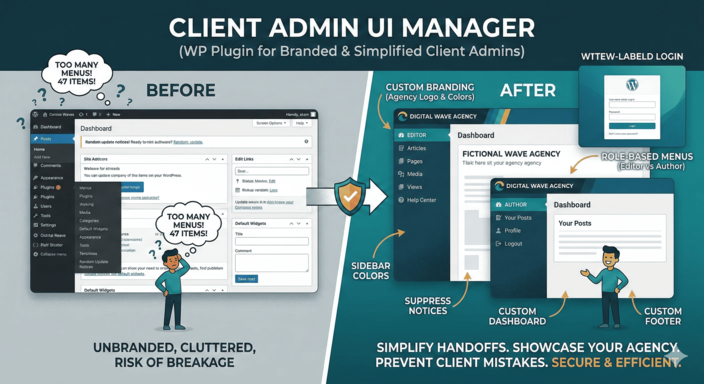
Create a clean, branded WordPress admin experience for your clients. Hide the complexity, showcase your brand, and prevent accidental breakage — all with role-based precision.
The Agency Problem: You hand over a WordPress site to a client. They see 47 menu items, get overwhelmed, and click something they shouldn't. Sound familiar? This plugin solves that.
🎯 Built For
- Agencies: Deliver white-labeled WordPress sites with your branding
- Freelancers: Simplify client handoffs and reduce support requests
- Teams: Give each role exactly what they need — nothing more
- Multisite Admins: Standardize the admin experience network-wide
🎨 Complete Branding Control
Make WordPress look like YOUR platform:
- Login Page: Custom logo, background, and colors
- Admin Bar: Hide WordPress logo, add your own
- Sidebar: Custom colors per user role
- Footer: Replace "Thank you for creating with WordPress" with your text
- Dashboard: Custom welcome panel with your branding
👥 Role-Based Menu Management
Different users need different menus:
| Action | Description |
|---|---|
| Hide Menus | Remove menu items per role (e.g., hide "Plugins" from Editors) |
| Rename Menus | Change "Posts" to "Articles" or "Blog Posts" |
| Reorder Menus | Drag-and-drop to reorganize the sidebar |
| Add Menus | Custom links (e.g., "Help Center", "Logout") |
| Icons | Change menu icons with Dashicons or Font Awesome |
📋 Admin Cleanup
Remove the noise:
- Suppress Notices: Hide all those "Update now!" and "Rate us!" nags
- Dashboard Widgets: Remove default WordPress widgets (Quick Draft, Events, etc.)
- Admin Bar Items: Hide "Howdy", "New", or any default links
- Help Tabs: Remove contextual help panels
- Screen Options: Simplify or hide entirely
🔒 Enterprise-Grade Security
We take security seriously:
- RBAC: All settings respect WordPress roles and capabilities
- Nonce Verification: Every form submission is validated
- Input Sanitization: All user input is cleaned
- Output Escaping: All rendered content is escaped
- Safe Redirects: Using
wp_safe_redirect()to prevent injection - Capability Checks: Admins only — no privilege escalation
💡 Real-World Use Cases
Scenario 1: Client Website
Client is an Editor. They see: Posts, Pages, Media, Comments. That's it. No Plugins, no Appearance, no Settings. Clean and safe.
Scenario 2: Multi-Author Blog
Authors see only their own posts. Editors see all posts but can't change site settings. Admins have full control.
Scenario 3: White-Label SaaS
Remove all WordPress branding. Custom login, custom dashboard, custom footer. Users never know it's WordPress.
📊 Quality Metrics
| Code Standards | 99% WordPress Coding Standards compliant |
| PHP Compatibility | 7.2 - 8.2 tested |
| Security Audit | Grade A+ (manual review) |
| Performance | < 10ms admin load impact |
📋 Requirements
- WordPress 5.0 or higher (6.x recommended)
- PHP 7.2+ (8.x fully supported)
- MySQL 5.7+
- Administrator access to configure
🎁 What's Included
- Full plugin (6 class modules)
- Professional admin styling
- Translation-ready (POT file)
- Documentation
- 6 months of updates
- Email support
🚀 Get Started in 5 Minutes
- Upload and activate the plugin
- Go to Settings → Client Admin UI Manager
- Configure branding (logo, colors)
- Set up menu visibility per role
- Save and refresh — done!
Related Products

AI Content Humanizer Pro
Bridge the gap between AI efficiency and human authenticity. Detect and humanize AI-generated content with 9-layer detection and GPT-4 powered rewriting.
WhatsApp CRM Lead Logger
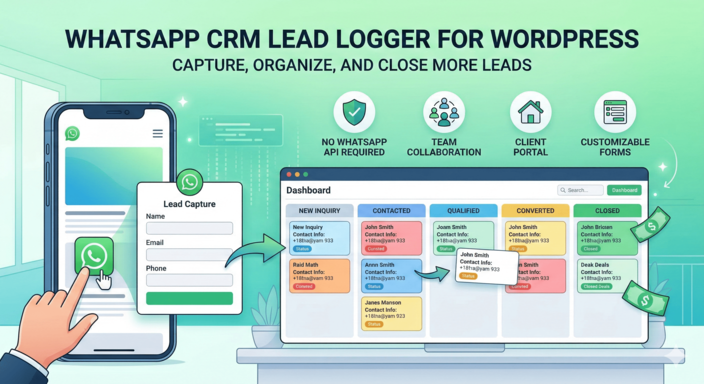
A lightweight WhatsApp CRM plugin that captures inquiries, organizes leads in a Kanban pipeline, and enables team collaboration.